


Grass Puzzle Launcher
4.56.00 Reviews
App Specs
- Version
- 1.0.8
- Updated On
- License
- Free
- Downloads
- 1,000,000+
- Developer
- Gamnest
- Categories
- Personalization
- Platform
- Android
Screenshots
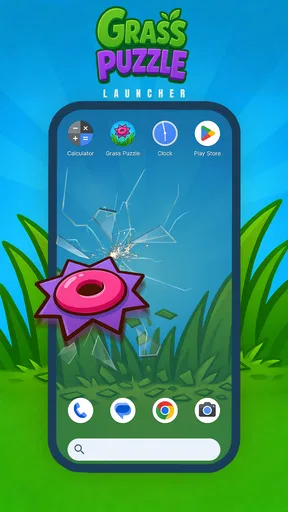
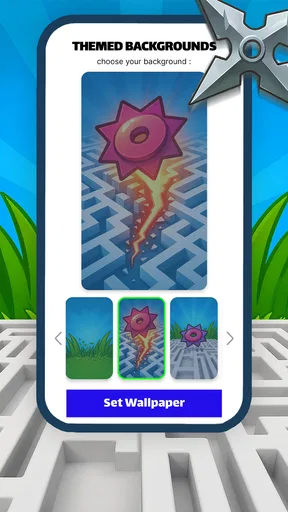
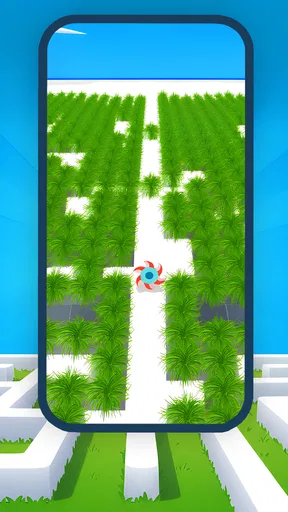
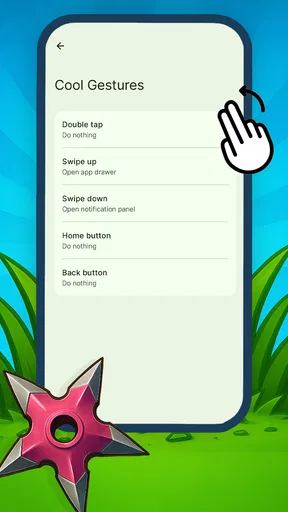
 Analysis by AppCompare
I approached Grass Puzzle Launcher as a small personalization app with a game-like idea: it turns the familiar act of planning a maze route into something you can use for a quick mental break. Its short store description calls it “Grass Puzzle,” while the broader promise is about planning moves and mastering mazes. In practice, that combination makes it feel less like a traditional launcher packed with customization panels and more like a focused, playful experience for people who enjoy visual puzzles.
That distinction matters before you install it. If you are looking for a full replacement for your phone’s home screen, with extensive icon packs, widgets, folders, and deep layout controls, this is probably not the first app I would choose. If you like the idea of a maze-centered interface and want personalization to feel more interactive than decorative, it has a clearer appeal. I found its strongest quality in that focused identity: it does not try to be every kind of customization tool at once.
How the maze idea works as a personalization experience
The developer is Gamnest, and the app is free, which makes it easy to try without treating the installation as a major commitment. It is listed for Everyone and supports Android 8.0 or later. Those details make the potential audience broad, although the practical experience still depends on whether the visual style and interaction pace suit you.
The first thing I noticed is how much the concept depends on orientation. A maze is not passive decoration. You need to look at a route, decide what to do next, and keep enough of the surrounding layout in mind to avoid wandering. That gives the app a more active rhythm than a static wallpaper or a conventional personalization utility. I enjoyed that difference when I wanted something that occupied my attention for a few minutes without becoming a full-length game session.
The planning element also changes how I judge the interface. In a normal customization app, I mainly ask whether settings are easy to find and whether changes are applied cleanly. Here, I also pay attention to whether the maze can be understood at a glance, whether the route remains visually distinct, and whether the interaction feels manageable when I am not concentrating perfectly. For this app, visual clarity is part of usability, not just decoration.
The store summary presents the central idea in very few words, and that simplicity is reflected in the overall appeal. You do not need to learn a complicated productivity system or build a large personal setup. The experience is better suited to short visits: open it, inspect the puzzle, make a few decisions, and move on. That makes it a reasonable option for a spare moment during a commute, while waiting for an appointment, or after finishing a task and wanting a small change of pace.
Readability and navigation for different users
Maze-based interaction naturally asks more from the eyes than a plain list or a simple shortcut grid. The user has to separate paths, walls, open areas, and the current position. For someone with strong visual attention, that can be satisfying because the challenge comes from interpreting the layout. For someone who finds dense patterns tiring, the same design can become demanding quickly.
Worth Reading Before You Choose

EA SPORTS FC Mobile 26 Is a Bigger Football Game, but It Takes Time

Flipboard Shows What News Apps Must Do Beyond the Feed

Switching to Android Auto Means Rethinking Your Driving Routine

Google Calendar Makes a Crowded Week Easier to Manage

Ludo King Makes the Most of the Minutes Between Plans

Baby Panda World Brings Quick Play to Modern Phones, but Its Game Library Feels Busy
I would approach the app in short sessions if visual fatigue is a concern. Instead of trying to complete every puzzle in one sitting, use it as a brief activity and pause when the route stops feeling easy to follow. This is a practical adjustment rather than a setting inside the app, but it makes a difference because the core interaction rewards concentration.
Navigation also has a mental side. A user who prefers direct, predictable controls may find a maze less immediately comfortable than a standard home screen. The route is not simply a matter of tapping the most obvious button; it asks you to interpret space and plan ahead. That can be a strength for people who enjoy visual problem-solving, but it is a genuine barrier for anyone who wants instant access with minimal decision-making.
I would not describe the experience as ideal for every reading level or attention style. The concept is easy to understand, yet completing a route can still require sustained focus. A person who is distracted by notifications, background activity, or a busy environment may lose track of the path more often than someone using it in a quiet room. That does not make the design poor, but it does mean that the app’s accessibility depends heavily on context.
One useful habit is to look at the whole maze before making the first move. Rushing into the nearest opening can create unnecessary backtracking and makes the experience feel harder than it needs to be. I found that treating each layout as a visual planning exercise, rather than a reaction test, produced a calmer and more readable session. This is one of the app’s less obvious strengths: it rewards deliberate observation more than frantic tapping.
Motor and sensory considerations
The interaction is likely to feel most comfortable for users who can make repeated, accurate touches and who do not mind working with a visually structured puzzle. Small errors can be frustrating in any maze-style activity, especially when the user knows where they want to go but does not land precisely on the intended control. I would therefore avoid recommending it as a universally effortless experience for people with tremors, limited dexterity, or difficulty with fine touch input.
That does not mean a user with motor limitations cannot enjoy it. The better question is whether the required movements feel controllable on a particular phone. A larger screen may make the visual route easier to inspect, while a compact device could make the same layout feel more crowded. The phone’s touch response, case, and the user’s preferred grip can all influence the experience. Because this is a direct interaction puzzle, those physical details matter more than they would in a mostly text-based personalization app.
Sensory comfort is another individual issue. Repeated patterns and maze structures can be engaging for one person and visually overwhelming for another. If you are sensitive to dense layouts, I would test it briefly rather than assuming that a calm-looking puzzle will automatically be comfortable. The app’s appeal comes from the maze itself, so users who need very simple, low-stimulation visuals may be better served by a plain wallpaper or a minimal launcher.
For users who rely on spoken guidance, magnification, switch access, or other assistive workflows, I would make the decision based on actual hands-on comfort rather than the age rating. An Everyone label tells me the content is broadly suitable, but it does not tell me that every interaction works equally well with every accessibility setup. That is an important distinction when choosing a visual puzzle as part of a daily phone routine.
A practical tip is to use the app when your hands are stable and your attention is available, rather than during moments when you are carrying something, walking quickly, or trying to multitask. This is not merely a matter of convenience. Maze planning and precise input both become less forgiving when the phone is being used in an unstable position.
Situational access in everyday use
I can imagine using Grass Puzzle during a short break at home, particularly when I want an activity that feels more engaging than scrolling but less demanding than a large game. The maze gives the break a clear boundary: I can focus on one route, finish, and put the phone down. That makes it more purposeful than opening a social feed with no clear stopping point.
It is less suitable when I need immediate, predictable phone access. If I am trying to reach a message, open a work tool, or switch between several tasks, a conventional launcher is the better choice. A personalization app should not slow down essential actions, and a maze-centered design is naturally less direct than a familiar grid of icons. This is the main trade-off I would explain to a friend: the unusual interface is also the reason it may not fit a busy workflow.
The app can also suit users who want a small cognitive challenge without committing to a long story, competitive match, or complicated ruleset. I would especially recommend trying it if you like puzzles that reward looking ahead. The experience is not about collecting a large set of features; it is about making the act of moving through a visual space feel interesting.
On the other hand, people who need strong customization controls should compare it with established Android launchers before replacing their current setup. Those alternatives usually focus on app access, home-screen organization, icon arrangement, widgets, and efficiency. Grass Puzzle belongs to a different lane. Its value is in the character of the interaction, not in turning every part of the phone into a configurable dashboard.
It is also worth considering the age rating in context. The Everyone classification makes it approachable for a wide household audience, but younger users may still need help understanding that the app is intended as a puzzle-like personalization experience rather than a standard shortcut screen. Older users or anyone unfamiliar with maze interfaces may likewise appreciate a brief explanation before deciding whether the design feels intuitive.
Where the experience still has barriers
The biggest barrier is the same feature that makes the app distinctive: the maze. A conventional launcher communicates destinations directly, while this app asks the user to interpret a route. That extra layer can be enjoyable, but it can also create friction whenever speed, simplicity, or reliable access matters more than novelty.
Another limitation is that the experience may not translate equally well across different screen sizes and personal visual preferences. A maze that feels comfortably spaced on one phone could feel more compressed on another. I would not judge the app solely from a quick glance at the concept; I would test a real session on the device that will be used every day.
There is also a learning curve, even though the basic idea is easy to grasp. Users who enjoy experimentation will probably accept that quickly. Users who expect a personalization tool to behave like a familiar home screen may wonder why they should plan a route at all. That is not a flaw that can be solved by explaining the app more clearly; it is a fundamental difference in purpose.
The current version is 1.0.8, and the app is still best approached as a focused experience rather than a mature replacement for every personalization need. I would keep expectations realistic: install it for the maze-centered interaction, not because you expect the breadth of a long-established launcher ecosystem. That mindset prevents the most common disappointment.
Its audience size suggests that many people have already found the concept appealing, with more than a million installs and an average rating of 4.5. Those figures make it look promising, but they should not replace personal testing. A strong average response can tell me that the idea works for many users; it cannot tell me whether the visual density, touch demands, or unusual navigation will suit my own habits.
The review count shown for the app is much smaller than the install figure, so I would treat public feedback as a useful signal rather than a complete map of every experience. In practical terms, the free price removes much of the risk. If the maze format feels uncomfortable after a few sessions, uninstalling it costs less than committing to a paid customization system that does not match your needs.
Who should install it, and who should choose another tool?
I would recommend it to someone who wants personalization to feel playful, likes visual route-planning, and is comfortable giving an interface a little more attention than a standard launcher. It can be a good fit for short breaks, casual puzzle sessions, and users who enjoy discovering a different way to interact with their phone.
I would be more cautious with someone who depends on fast one-tap access, uses a phone while multitasking, or finds patterned visuals tiring. People with motor challenges should test the touch interaction carefully on their own device, especially if precise taps are difficult. Users who need extensive home-screen organization should look first at a conventional launcher, because that category is built around efficient access rather than maze navigation.
For families, the Everyone rating and free price make experimentation straightforward, but I would still observe how each person handles the visual route. A child may enjoy the puzzle immediately, while an older family member may prefer a simpler screen with larger, more direct targets. Inclusive use is not just about whether the content is appropriate; it is about whether each person can understand and control the interaction comfortably.
My inclusive verdict
Grass Puzzle Launcher is an unusual personalization app because its identity comes from making navigation feel like a maze puzzle. I liked that it gives a short phone break a clear activity and rewards planning instead of endless scrolling. Gamnest has chosen a narrow idea, and that focus is more convincing than pretending to replace every kind of launcher.
At the same time, the design is not universally convenient. Visual interpretation, sustained attention, and accurate touch input all influence how comfortable it feels. It is less appropriate for urgent access, low-stimulation needs, or users who want a highly organized home screen with conventional shortcuts. Those are meaningful limitations, not minor details.
My final recommendation is simple: try it if you want a free, maze-based personalization experience and enjoy taking a moment to plan your next move. Approach it as a focused puzzle interface, not as a complete substitute for a traditional launcher. The right user will find its unusual navigation refreshing; the wrong user will experience it as an avoidable obstacle.
Pros
- Relaxing grass-cutting puzzle gameplay is easy to learn.
- Short levels make it suitable for quick gaming sessions.
- Minimalist visuals keep the interface clear and uncluttered.
- Offline play is useful when you have no internet connection.
- Increasing level complexity provides a gradual challenge.
Cons
- Repetitive mechanics may become less engaging over time.
- Some puzzles can feel too easy for experienced players.
- Ad interruptions may affect the otherwise relaxing experience.
- Limited customization reduces long-term personalization options.
- Performance may vary on older or low-end devices.
FAQs for Grass Puzzle Launcher
What is Grass Puzzle Launcher, and how does it change an Android device?
Grass Puzzle Launcher is an Android launcher that combines a customizable home-screen interface with puzzle-inspired visual elements. After installation, it can replace your standard launcher and organize apps, widgets, shortcuts, wallpapers, and menus in a different layout. Before downloading, remember that the exact appearance and available tools may vary by device, Android version, and the launcher’s current update.
Is Grass Puzzle Launcher free to download and use?
Grass Puzzle Launcher may be available as a free download, but users should check its Google Play listing for the latest information about advertisements, optional purchases, or premium customization features. Free launchers sometimes include promotional content or locked themes and settings. Reviewing the permissions, in-app purchase details, and developer information before installation is the safest way to understand the complete cost.
Can I customize the wallpaper, icons, widgets, and home-screen layout?
Customization is generally one of the main reasons to install a themed launcher such as Grass Puzzle Launcher. Depending on the version, you may be able to change wallpapers, arrange icons, add widgets, adjust screen layouts, and apply puzzle or grass-inspired visual styling. However, not every Android phone supports the same options, so check the app description and test settings carefully after installation.
Will Grass Puzzle Launcher affect my phone’s performance or battery life?
A launcher runs whenever you use the home screen, so its effect on performance depends on your phone’s hardware, Android version, animations, widgets, and background services. On newer devices, the difference may be minor, while older phones could experience slower transitions or slightly increased battery use. If the interface feels heavy, reduce animations, remove unnecessary widgets, or switch back to your original launcher.
Is Grass Puzzle Launcher safe, and how can I return to my previous launcher?
Download Grass Puzzle Launcher only from a trusted official source, such as Google Play, and review its developer details, permissions, privacy information, and recent user feedback before installing. To return to your previous interface, open Android Settings, search for Default apps or Home app, and select the original launcher. You can then uninstall Grass Puzzle Launcher if you no longer want to use it.


